Best walking apps for iPhone in 2026, by what you need
Quick answer: there is no single best walking app, because walkers want different things. To get a new walking route without planning it yourself, use Daily Wander: it is free on iPhone and generates a loop of the time or distance you choose from where you are. To count steps only, the built-in Health app already does it. For weight loss, use a step target plus planned walks you will actually repeat. For directions to a specific place, use a map app.
Daily Wander is our app, so we tell you where it fits and where something you already have on your iPhone is enough. This guide links to no other apps.
Pick by goal
| Your goal | What the app must do | Free option on iPhone |
|---|---|---|
| New walking routes | Create a route of a set time or distance that starts and ends near you | Daily Wander (free download, optional Premium) |
| Counting steps | Count steps and distance in the background, all day | The built-in Health app |
| Weight loss | Set a realistic daily target and make it easy to repeat | Health for steps, plus a planned walk such as a 30-minute loop |
| Directions to a place | Turn-by-turn walking directions from A to B | A map app; see how to plan a walking route in Google Maps |
| A record of where you walked | Save the route map, time and distance of each walk | Daily Wander History, or a walk workout (see where to find your walking route on iPhone) |
Best walking app for planning walking routes
Most walking apps record a walk after you have decided where to go. The harder part for a daily walk is that decision: which streets, how far, and how to get back without retracing your steps.
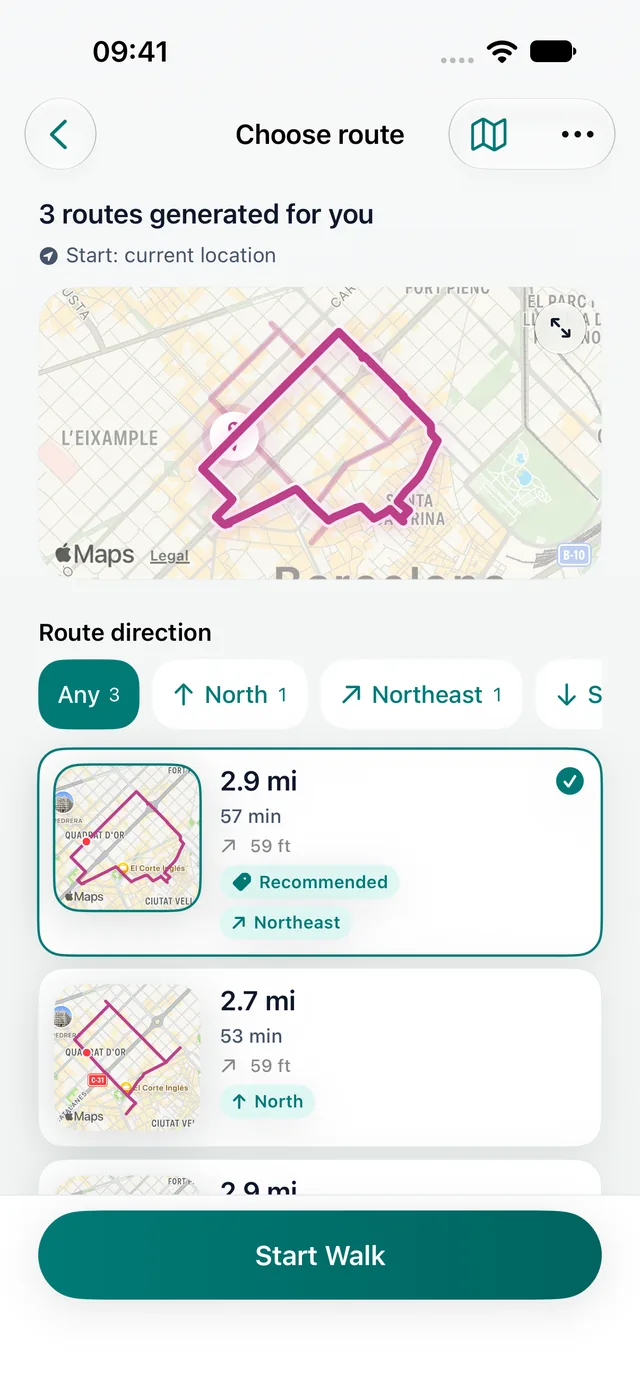
Daily Wander is built for that moment. Choose a walking time or distance, and it generates a circular route from your current location that brings you back near your start. Check the loop on the map, start walking, and follow the directions. Completed walks are saved with their map, distance, time and steps.
- Good for: lunch breaks, after-dinner walks, new neighborhoods, travel days and walkers bored of the same block.
- Not for: getting to a known address. Use a map app for that.
- Free: the download and a daily generated loop are free. Comparing three route choices and some extras need Premium.
If you prefer to choose by time, see the walking route planner by time. For round trips specifically, see the circular walking route planner.
Best free walking app
"Free" means different things in walking apps. Some are free to download but put core features behind a subscription. Others are free because they show ads. Before you commit to a habit, check three things in the App Store listing:
- What the free version does every day. You should be able to walk, record and review without paying.
- Whether it asks for an account first. A walking app should work from the first open.
- What the subscription adds. Extras are fine, but the reason you downloaded it should not be one of them.
On iPhone you already have a free step counter in the Health app. Daily Wander adds what Health does not do: a new walking route of the length you choose, from wherever you are.
Best walking app for weight loss
No app burns calories for you. What helps is a daily target you can reach and a walk that is easy to start. A practical setup:
- Use steps as the scoreboard. Health shows your daily average. Raise it gradually; our guide to how many steps a day to lose weight explains realistic targets.
- Plan the walk, not just the number. A fixed 30–45 minute loop is easier to repeat than "walk more". Generate one with a 30-minute walk route planner.
- Add intensity when walks feel easy. Intervals of faster walking raise the effort without making the walk longer. See Japanese walking for a simple 30-minute method.
- Keep a streak. Seeing completed days helps the habit stick; see how to build a 30-day walking streak.
US physical activity guidelines recommend at least 150 minutes a week of moderate activity, such as brisk walking. Five 30-minute walks meet that. CDC physical activity guidelines
Best walking app for iPhone: built-in or download?
Your iPhone already counts steps and walking distance in the Health app, using its motion sensors, with nothing to install. If that is all you want, you do not need another app.
Download a walking app when you want something Health does not do: a route to follow, directions during the walk, a map of where you went, or a reason to walk somewhere new. Daily Wander works on iPhone alone; an Apple Watch is not required. Apple Health sync is optional and only happens with your permission. More detail is on the free walking app for iPhone page.
Best walking app for directions
For directions to a place you know, a map app is the right tool. Walking apps that create routes, including Daily Wander, answer a different question: "where can I walk from here and come back?" Many walkers use both: a map to reach a park or neighborhood, then a generated loop once they are there.
If you want to plan your own route in a map app, our guide on how to plan a walking route in Google Maps walks through the steps.
What makes a walking app accurate?
Accuracy depends on how the app measures:
- Steps come from the phone's motion sensors. They are most accurate when the phone is in a pocket or on your body, not in a bag or a stroller.
- Distance on a map comes from GPS. It is most accurate outdoors with a clear view of the sky. Tall buildings and dense trees can make the trace wander.
- Walking time estimates assume an average pace of about 3 mph. Use the walking time and distance calculator to check your own pace.
Allow precise location while walking, keep the app open or allowed in the background, and compare a known distance once, for example a mile walk, to see how your phone performs.
How to choose your walking app in two minutes
- Write down your one main goal: routes, steps, weight loss, directions or a walk record.
- Check whether Health already covers it.
- If not, download one app for that goal and use it for a week before adding another.
- Keep the app that makes it easiest to walk out the door.
FAQ
What is the #1 walking app?
It depends on your goal. For new walking routes that start and end near you, Daily Wander is our pick on iPhone. For step counting only, the built-in Health app is enough. For directions to a known place, use a map app.
Which is the best walking app for free?
On iPhone, the Health app counts steps for free. For free walking routes, Daily Wander is free to download and generates a daily loop from your location; Premium is optional.
Is there a 100% free walking app?
The built-in Health app is completely free and counts steps and walking distance. Most downloadable walking apps are free to start with optional paid extras, so check what the free version includes before you build a habit around it.
What's the most accurate walking app?
Accuracy depends more on how you carry your phone than on the app. Step counts are most accurate with the phone on your body; GPS distance is most accurate outdoors under open sky. Test your app once on a known distance.
Is there a free walking app to help lose weight?
Yes. Use the free Health app to track daily steps, and a free route app such as Daily Wander to plan a walk you will repeat. Consistency matters more than the app.
Is a 30-minute walk every day enough to lose weight?
A daily 30-minute brisk walk meets US activity guidelines and supports weight loss when combined with eating habits that create a calorie deficit. Adding faster intervals, as in Japanese walking, raises the effort in the same time.
Which app has the best walking directions?
For directions to a specific address, use a map app. Daily Wander gives walking directions along the loop it generates, for walks where the route itself is the goal.
Do I need an Apple Watch for a walking app?
No. Daily Wander and the Health app both work with iPhone alone.
Free on iPhone
Get a new walking loop today.
Choose a time or distance, and Daily Wander generates a circular route from where you are. Check it on the map, then follow the directions. Free download; Premium is optional.