Best walking apps in the UK for 2026: choose by what you need
Quick answer: the best walking app depends on the job. For a new circular walk from your door without planning it yourself, use Daily Wander: it is free on iPhone and generates a loop of the time or distance you choose, in miles or kilometres. For counting steps only, the built-in Health app already does it. For directions to a postcode or station, use a map app.
Daily Wander is made by us, so we say plainly where it helps and where your iPhone already has what you need. We do not link to other apps on this page.
Which walking app for which job
| You want to | The app needs to | Free option on iPhone |
|---|---|---|
| Find a new circular walk | Create a round walk of a set time or distance from where you are | Daily Wander (free download, optional Premium) |
| Count steps | Count steps and distance in the background | The built-in Health app |
| Lose weight | Set a daily target and make the walk easy to repeat | Health for steps, plus a planned loop such as a 30-minute walk |
| Get to a place | Walking directions from A to B | A map app; see how to plan a walking route in Google Maps |
| Keep a record of walks | Save each walk's map, time and distance | Daily Wander History, or a walk workout (see where to find your walking route on iPhone) |
Best app for walking routes in the UK
Recording a walk is easy. Deciding where to go is the hard part, especially when you want a round walk that does not double back along the same road.
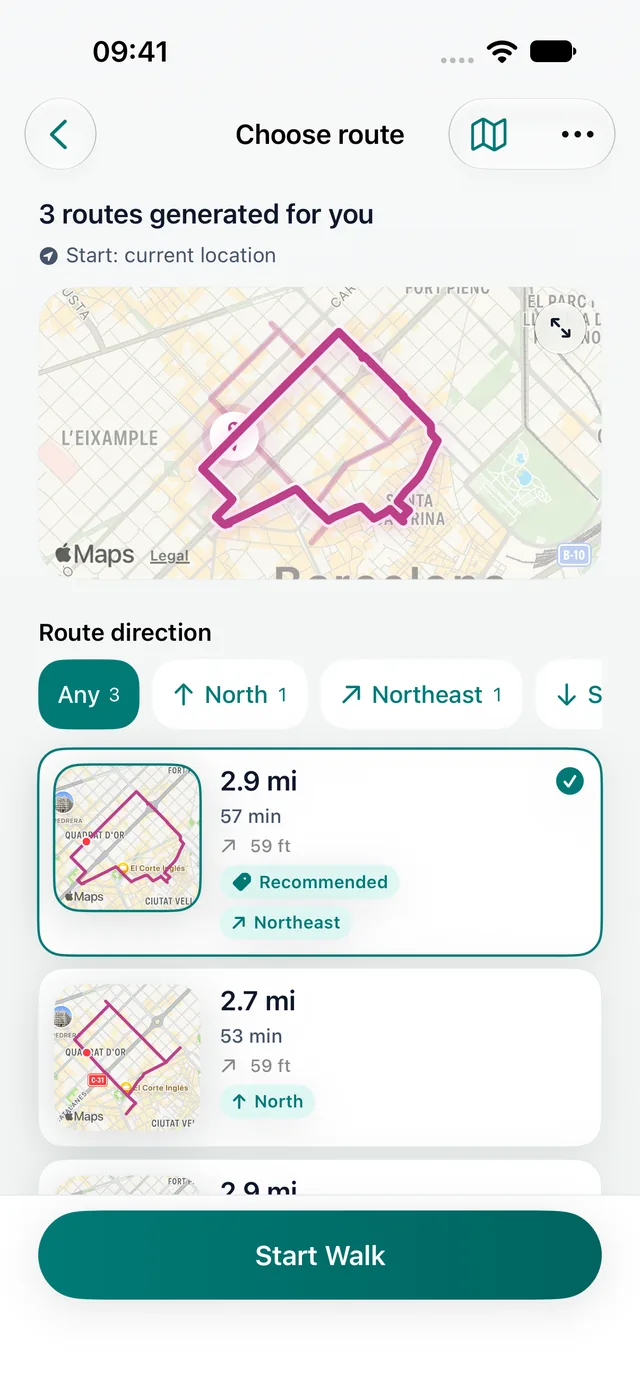
Daily Wander starts with that question. Pick how long or how far you want to walk, and it builds a circular route from your current location that finishes near where you began. Check it on the map, set off and follow the directions. Each completed walk is saved with its map, distance, time and steps.
- Good for: lunchtime walks, evening loops, a new town on holiday, and anyone tired of the same circuit round the block.
- Not for: following a published long-distance path or a guidebook walk. Use the route's own map for that, and check local access and closures before you go.
- Free: the download and a daily generated loop are free. Comparing three route options and some extras need Premium.
More on planning loops: the UK walking route planner, the circular walking route planner and the loop walk generator.
Best free walking app
A free download is not always a free app. Before building a habit around one, check the App Store listing for:
- What you can do every day without paying. Walking, recording and reviewing should all work.
- Whether you must create an account first. A walking app should work from the first open.
- What the subscription unlocks. Extras are fine; the feature you downloaded it for should not be one of them.
Your iPhone already includes a free step counter in Health. Daily Wander adds a new walking route of the length you choose, from wherever you happen to be.
Best walking app for weight loss
Any app can show a number. What changes your weight is a target you reach most days and a walk that is easy to start:
- Track steps in Health and raise your daily average gradually. Our metric guide to how many steps a day to lose weight uses kilometres and kilograms.
- Plan a regular loop. A fixed 30–45 minute circuit is easier to repeat than "walk more". Start with a 30-minute walk route.
- Add brisk intervals once your walks feel easy. Japanese walking alternates three fast and three easy minutes for half an hour.
The NHS recommends adults do at least 150 minutes of moderate-intensity activity a week, and brisk walking counts. NHS physical activity guidelines
iPhone: do you need to download anything?
Health counts your steps and walking distance automatically, using the iPhone's motion sensors. If a daily step count is all you want, you need nothing else.
Download a walking app when you want what Health does not offer: a route to follow, directions while you walk, a map of where you went, or a nudge to walk somewhere new. Daily Wander runs on iPhone alone, with no Apple Watch needed, and Apple Health sync is optional. See the UK walking app for iPhone page for more.
Best walking app for directions
To reach a station, a pub or a postcode, a map app is the right tool. Route-generating apps such as Daily Wander answer a different question: "where can I walk from here and get back?" Plenty of walkers use both: a map to reach a park or village, then a generated loop once they arrive.
To plan your own route by hand, our guide on how to plan a walking route in Google Maps covers the steps.
Accuracy: steps, GPS and walking times
- Steps come from the phone's motion sensors and are most accurate with the phone in a pocket, not a bag or a pram.
- Map distance comes from GPS and is best outdoors under open sky. Narrow streets, cliffs and woodland can make a trace wander.
- Walking times assume a steady pace of roughly 5 km/h (3 mph). Check yours with the walking time and distance calculator.
FAQ
What is the best walking app in the UK?
It depends on what you want. For new circular walks from where you are, Daily Wander is our iPhone pick. For counting steps only, the built-in Health app is enough. For directions to a place, use a map app.
What is the best free app for walking routes in the UK?
Daily Wander is free to download on iPhone and generates a daily circular walk from your location in miles or kilometres. Comparing several route options needs the optional Premium.
Is there a completely free walking app?
The Health app on iPhone is completely free and counts steps and walking distance. Most downloadable walking apps are free to start with optional paid extras.
Which walking app is most accurate?
How you carry the phone matters more than the app. Keep it on your body for steps, and walk in the open for the best GPS distance. Try it once on a measured distance.
Can I use a walking app without an Apple Watch?
Yes. Daily Wander and the Health app both work with iPhone alone.
How long should a daily walk be?
The NHS recommends at least 150 minutes of moderate activity a week, for example five brisk 30-minute walks.
Free on iPhone
Get a new circular walk from your door.
Choose a time or distance in miles or kilometres, and Daily Wander builds a round walk from where you are. Check it on the map, then follow the directions. Free download; Premium is optional.